- Week 2
- Educational Technology paper:
- Curriculum resource:
YANKO'S RUSSIAN WEAPONS CATALOG
A Russian weapons catalog may not seem like much of a curriculum resource until you consider what it is I'm given to teach. My "students" want to know how to fight and win (and survive to fight again) on the modern day battlefield. Most often that means opposing Russian (Soviet) equipment and tactics. Yanko's Russian Weapons Catalog appears to be an excellent resource for sizing up the threat in this area.
If I broke the code successfully, Yanko's has only been on the "web" since September 7, 1997. They offer a great deal of information on a plethora of equipment developed and produced by the former Soviet Union and Russia. The information ranges from the development, fielding, and modifications of Weapon systems to a comparison guide with NATO and U.S. equipment. The web site also offered broken English and attempts at pro-Russian propaganda. The whole experience of browsing their site left me feeling a little Tom Clancyish. I definitely didn't feel like signing their guest book or getting on their mailing list.
At the height of the cold war, military planners went to great effort and expense to gain access to even the smallest scraps of information that could shed some insight into Soviet hardware in use. Since the breakup of the Soviet Union a great deal of equipment from the Russian (and other former Soviet states) military has come on the open market. Where before we could get only the tiniest scraps of information now the entire weapon is a available to the highest bidder. I'm told web sites like Yanko's are popping up all over. Some even include prices and ordering information.
As a Tactical Operations Officer I intend to integrate this site with my other information sources to help round out the knowledge we have on various weapons systems currently in use. I will provide that information to the individual aviators through formal and informal instruction, and develop tactics, techniques and procedures to best counter the threat they pose. - News article:
TECHNOLOGY IN THE NEWS
by Gale L. Dingwell
GRED 614
Home office guide, Consumer Reports, September 1997.
In my childhood home we a small antique chest. Originally this chest supported a water basin and pitcher. It had a small drawer for personal items. And lastly it had a discreet cabinet for a chamber pot. We used this chest (called a commode) to keep our bills, envelopes and stamps in. Combined with our kitchen table it formed our "Home Office."
This article in Consumer Reports really opened my eyes to the impact the personal computer has had in our daily lives. Ten years ago a home office was a rarity; for the self-employed or well-to-do. The article points out that now you'll have to compete with other family members for space in today's home office. Kids to grandparents all have an interest in the equipment that makes up the modern home office.
This article compared equipment for performing the following functions; Printing Computer Files, Making Photocopies, Sending and Receiving Text, Sending and Receiving Images, and Phone Messages. These were the functions they believed to be essential to the home office. They compared a number of devices from Personal Computers to Answering Machines and offer their rating of each.
It relates to my current situation in a number of ways. First because I am in this class and interested in technology in education. The home computer has virtually replaced my set of Encyclopedia Brittanicas as a reference to students. Interactive software has kids learning in their preschool years. Secondly it impacts me at a personal level, as a parent and homeowner I and my family do everything from balance our checkbook, to Reader Rabbit, to video games on our computer. As we become more accustomed to it we find more utility for it (man is shaped by his tools). Professionally the workplace blends seamlessly with home as the computer allows me to get work done outside of normal duty hours.
My mom still has the commode, and someday I hope to have it in my home. I don't think it will replace my current home office though.
- Week 3
- Educational Technology paper:
www.astd.org/magazine/current/toc.htm
Training and Development Magazine (is the flagship publication of the American Society for Training and Development (ASTD). Published monthly Training and Development covers a wide variety of topics relevant to those in involved in workplace training and productivity. This month's issue cover topics from workplace communication to building a web site, to training workplace technophobes.
Of particular interest to me was an article under the heading of Industry Focus that dealt with the U.S. Army. To be specific it dealt with the struggles of training standards -vs- job standards. This issue is relevant to almost any manager when observable behaviors in training may not replicate desired behaviors on the job. This occurs primarily because it's often difficult to replicate workplace behaviors in training when expensive machinery or resources are involved. In the Army the desired behavior on the job is an enemy force destroyed or cowed into submission - something that's difficult to replicate in training. (The Army's job is to kill people and break things - Rush Limbaugh)
For managers at large Training and Development is a valuable resource, for those involved in training it indispensable. It blends technology, technique, and human nature better than any publication I've encountered. I intend to join ASTD and look forward to receiving this publication, (right now I'm happy to swipe it off their web page).
- Curriculum resource:
Aircraft Survivablility Equipment Trainer version II
A curriculum resource
Gale L. Dingwell GRED 614
Are you an insomniac? Do you spend long, sleepless nights? Do you have a security clearance? Let me introduce you the Aircraft Survivability Equipment Trainer (ASET II).
Like many things the Army undertakes, the ASET started with a good idea and then went tramping through the woods, past the point of diminishing returns, to the land of meaninglessness. The Army perceived a need to conduct recurring training on the aircraft systems, techniques, and procedures that allow air crews to fight and survive on the high threat battlefield. The equipment portion is lumped together and called Aircraft Survivability Equipment. In the late '80s the Army fielded the Aircraft Survivability Equipment Trainer (ASET). The ASET was Z-80 based computer used in all the wrong ways. Concerns over security, lag time from conception to manufacture to fielding, and a general ignorance of computer aided instruction produced a product that seemed like something from Nightmare at Radio Shack. Pilots hated this device and would do nearly anything to keep from using it. To make matters worse, the security consideration meant that the devices were often difficult to gain access to.
ASET II was to solve all that. Using more modern technology, increasing accessibility and updating the instruction methods was to provide a dynamic training device keeping our pilots "on the cutting edge." Like a bad sequel to a bad movie, ASET II issued forth in 1992. Based on a 80286 processor the hardware was woefully behind technology at it's arrival. To make matters worse, security concerns will not afford us a hard disk drive. Software comes from floppy diskettes and a large laser disk. All griping aside we do receive some utility from this equipment.
Training is conducted in one of two modes. Mode one is the Tutorial. Tutorials consist of self-paced guided instruction through a series of topics ranging from theory, to specific weapon systems, to tactics, techniques and procedures to defeat these systems. A pretest and post-test are available at each level. Students are not allowed to precede without receiving a minimum score. Mode two is the game mode. (Annie get your gun! The Russian are coming! The Russians are coming!) This is where aviators place their skills to the test. Through a series of prompted and unprompted exercises the student reacts to various battlefield scenarios. Student responses are judged by correctness and time to respond, and a coefficient of survivability is produced (Over 1.0 and you don't pass go or collect $200.00).
I require the aviators in my unit to complete tutorials monthly and the game mode annually. Occasionally I will conduct a game mode competition with the pilot producing the lowest Coefficient of Survivability receiving bragging rights. ASET II is here to stay for a while but other systems are being produced to test crew skills in the cockpit of actual aircraft. At $2000.00 per flight hour this can be expensive training though.
I would like to develop a more dynamic system based on Pentium or 686 computers. Security concerns will have to be overcome and I'll have to find the time. But, I always keep in the back of my mind: "Our soldiers don't have to be perfect, just better than the enemy!" GLD
- News article:
A FORT DRUM INTRANET TO AID INFORMATION FLOW FOR COMMUNITY
Fort Drum Sentinel, September 11, 1997
by Gale L. Dingwell, GRED 614
Information flow has always been the linchpin of military operations. Lee lost at Gettysburg due to a lack of timely information. Hitler learned only too late of the D-Day invasion to issue critical orders for defense. On a day to day level, coordination meetings consume more and more of a leader's time. Still later we find out that once more "the truth has changed."
Enter www.drum-intra.army.mil aka the Fort Drum Intranet. Launched only recently the intranet is designed to streamline the flow of information getting it into the hands of those who need to know. Soldiers, civilians and retirees will all benefit from this system. The main thrust is to provide a conduit for the latest and most accurate information to users. Minutes from unit meetings, changes in policy, changes in veterans benefits etc. will all find their way into this network. Graphics and other frills will be kept to a minimum to keep the system as efficient as possible.
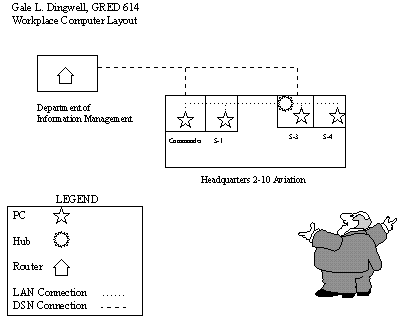
To launch this program Fort Drum has been upgrading computers, issuing modem driver and anti-virus software, and providing instruction to end-users at the unit level. By next July the Department of Information Management (DOIM) hopes to have 100 major buildings on post bound together by this intranet.
It's unknown whether the intranet will win the next war, but if it cuts down on a couple meetings a month, helps soldiers arrive at the right place at the right time, or lets a retiree receive his/her benefits without the red tape - I'd call it a success. The Army has traditionally been slow to change. Leaders routinely joke that "the Army has 200 years of tradition unhindered by progress." Perhaps the intranet can usher in a new era. (Probably not) GD
- Educational Technology paper:
- Week 4
- Educational Technology paper:
Week Four - Curriculum Resource
ERIC INFORMATION TECHNOLOGY CLEARINGHOUSE
(ericir.syr.edu/ithome/)
by Gale L. Dingwell
GRED 614While knee deep in Education Research I was introduced to ERIC. The ERIC I used was located in the library at JCC and consisted of a clunky computer sporting a CD ROM database. The information was reliable (if sometimes dated) and became a major resource in that class.
ERIC on-line blows that all away. In spite of the finicky nature of my PC (maybe something it ate), I really liked exploring the on-line version of ERIC. The clearinghouse I spent most of my time in was Information Technology. This clearing house is run from Syracuse and includes the following separate pages:
Welcome - An introduction to this clearing house.
Database - The link to allow you direct access to the ERIC database.
Publications - Let's you explore various ERIC/IT publications and products.
Digests - Provides a brief overview of topics of current interest and references.
Library and Information Science - Key associations related to Library and Inf. Science
Educational Technology - Association specializing in educational technology.
New - Latest products and projects from ERIC/IT.
Links - Links to a wealth of sites on a variety of education topics.
Communities - Virtual Communities (referred to as listservs)
AskERIC - An ERIC virtual library.This ERIC/IT site seems like a super resource. I wish I had been connected to it in my Ed. Research class! For professional educators it seems a must. Particularly when honing curriculum or developing resources. Outside of the education field it seems like it might be of limited utility. I'll be interested to here what the other ITMM students think of it. GL
- Curriculum resource:
Week Four
Education Resource "Mrs. Ross's Home Page"
by Gale L. Dingwell
GRED 614How exciting it is to see teachers putting their time and energy towards building a resource like this home page. As a fan of History (my undrgrad major) I greatly enjoyed this web site. I liked how she started with some basic themes (Native Americans, Explorers, Other History etc.) and built those into a type of knowledge tree that would allow the student to explore on their own different people, places, and things. I also liked how she kept it simple without a lot of complex graphics that bog down older computers like mine (some distract from the content as well).
My concern about all this is I fear that making so much information available so easily diminishes the process of discovery. I compare this to the difference of going to the supermarket to buy corn or growing your own garden. For certain not all of us have the time or the inclination to garden, but the payoff for those who do is more than fresh vegetables. It's the satisfaction of the process as well. I sometimes fear that by taking the expressway to learning we are missing the scenery. That scenery which builds character, confidence, and a richness of life.
Conclusion: I feel Mrs. Ross did an excellent job of preparing this resouce. She easily meets her objectives. I would use such a resource with close supervison though, woven tightly into a balanced curriculum that includes more traditional learning exercises. I also like how she uses a potentially unbridled resource like the internet and tames it for in-school use. She takes a technology which kids seem to love an makes good use of it. Good job!
- News article:
Week Four Technology in the News
Using the Internet as a Career Planning Tool by Richard Koonce Career Planning
reviewed by Gale L. Dingwell
GRED 614The author starts right in "I don't think of the internet a just a job search tool...I think of it as a professional development tool for educating yourself on job searches and career transitions, researching prospective employers, tracking trends, making contacts with other people, and identifying and generating professional opportunities." He continues on that too many people believe that technology will miraculously pave a path to an employer's door and also get them hired.
Mr. Koonce calls the internet a "New Kiosk." He confesses that as a reporter he got used to consuming three major newspapers daily. This craving for information lend well to the internet where major news organizations post headlines and top stories with the convenience of home delivery. He says that potential job seekers or those building careers need to focus on the trends shaping their workplace. Often the business section is a good jumping off site.
The internet also has it's share of classified ads. He lists one site Career Path as one of the most widely used job-oriented sites on the internet. Career Path has positions listed in the employment sections of more than 24 major newspapers.
Lest technogeeks get their hopes up too high Mr. Koonce points out that whereas the internet can perform a lot of the leg work electronically - hiring decisions usually come only after an in-depth interview (people skills are still in demand). My hope is that with all the job dissatisfaction by employees and employee dissatisfaction by employers the information gleaned from the net could help fit the right person to the right job more effectively than previous methods.
- Educational Technology paper:
- Week 5
- Educational Technology paper:
Week Five Ed. -Tech. Review
ERIC NO-ED356276
TITLE - Individual Differences in Learning from an Intelligent Discovery World: Smithtown.
reviewed by Gale L. Dingwell
GRED 614I decided to pursue a behaviorist point of view; mainly as the military cares little about cognitive events only displayed behavior. It was coincidental that the ERIC search I made ended up with research conducted by the United States Air Force.
The researchers in this study believed that using Computer Assisted Instruction (CAI) in the form of a program called "Smithtown" would improve student performance learning microeconomics. The research concluded that the students using "Smithtown" fared very well against those using more traditional teaching methods. The results were born out in a second study with a greater student group.
I came to the following two conclusions:
1) Computers used creatively in conjunction with traditional learning helps students to learn complex (and boring) material faster.
2) If the Air Force is putting forward this kind of research their might be hope for our military yet.
- Curriculum resource:
- News article:
Week Five - Technology in the News
Copyright, Copywrong by Kira Marchenese et al. Copyright, Copywrong
reviewed by Gale L. Dingwell
GRED 614Last week's discussion on "getting" things from other sites sparked my interest. When I ran across this article I new it was a must. The authors here not only write a brief overview of the issues at stake but compiled a list of related articles that you can jump to.
At the heart of the issue is the ease which something posted on the net can be copied and redistributed. The internet is a growing marketplace where intelectual property is for sale right along with snow tires. The problem is that much intellectual property is easy to steal from the net without paying royalties to the copyright holder. Furthermore many people are finding their property (articles, programs, art etc.) being posted on the net without their knowledge or permission. Once on the net it is copied and distributed without their control.
At the opposite end of the spectrum are those who feel copyright laws are outdated and that intillectual property should be distributed free of charge for the benefit of everyone. These people stay ahead of the law by computer trickery and a half-hearted effort by the authorities to enforce copyright law.
I feel it's logical that if someone works to develop something that is uniquely their own invention that person should expect to be financially or otherwise rewarded. Computer theft of property is just as serious as taking a painting off the wall of an art museum or stealing books from the library. Eventually we all lose. GLD
- Educational Technology paper:
- Week 6
- Educational Technology paper:
- Curriculum resource:
- News article:
- Educational Technology paper:
- Week 7
- Educational Technology paper:
- Curriculum resource:
- News article:
- Educational Technology paper:
- Week 8
- Educational Technology paper:
Instructional Model for Power Point Presentation
"ALQ 144 Infrared Countermeasures Set"
by Gale L. Dingwell
GRED 614Instructional Model used: Hannafin Peck
Desired End-State: Pilots will be able to properly Inspect, and Employ the ALQ 144 Countermeasures Set against threat weapon systems.
Results of Needs Assessment:
1) Pilots are unfamiliar with preflight inspection criteria.
2) Pilots do not understand built in test (bit) procedures.
3) Pilots do not have an understanding of effectiveness against various weapon systems.
Design:
The prescribed design would be a multiple slide Power Point Presentation that could be used in conjunction with a lecture; guided discussion or as a stand-alone tutorial. The resulting presentation would include text, graphics, audio and video. The audio and video would be kept to a minimum to conserve memory and would serve to reinforce feedback from power-up and bit procedures.
Development:
Throughout the design process I will enlist aviators of various skill levels to construct and review the slides and provide feedback. Changes will be included where instruction is ambiguous or inaccurate.
Implementation: (It's good to be king)
Direct that aviators will view this presentation either as a group or individually and complete pre and post instruction written tests of knowledge to ensure instructional goals are met. Continue to revise where shortfalls are identified.
GLD
- Curriculum resource:
Currriculum Resource
Guidlines For Creating Multimedia by Lynn Regan
www.teachersworkshop.com/twshop/multimed.html
by Gale L. Dingwell
GRED 614This resource (www.teachersworkshop.com/twshop/multimed.html) is part of the offerings from Teachers Workshop (www.teachersworkshop.com). It seems to provide some good basics for integrating multi-media into your classroom. It came as a result of searching or video "how to's". Ms. Regan is a winner of the IBM Technology Teacher of the Year Award, and is a classroom teacher in New Jersey. She developed a multi-media rich classroom for her students with special needs.
The main topics include: LINKWAY Advantages, Students Create Multimedia, and Skills Strengthened by Multimedia. The endstate desired is improved communication skills, enhanced oral communication, enhanced curriculum, increased student self-confidence.
This resource is a sample of what is available through the Teachers Workshop. They have a variety of other products as well ranging from audio/video products to software, to a teachers information exchange. If I were a full-time teacher I would pay close attention to the offerings of this firm.
GLD
- News article:
Technology in the News
ADSL Bids for Commercial Turf by Chris Oakes
reviewed by Gale L. Dingwell
GRED 614I found this article on Wired News (www.wired.com/news/news/technology/story/7863.html) It covers the subject of Asymetric Digital Subscriber Lines (ADSL) which is a new technology replacing current copper telephone lines for internet subscribers. The ADSL offers speeds which compare to that of a T1 line at 1.54 Mbps and more. However it is much cheaper than ISDN lines. The subscription price should begin at $19.95 per month. The installation price will be a show-stopper for small users at upwards of $1000.00. This fee however may be prorated over the life of the subscription.
Currently the are about nine service providers which offer commercial ADSL or DSL a variation therof - for either Internet of intranet access. Their major hurdle comes from the regional Bell Operating Centers which would provide the ADSL to copper interface. These Bell providers have been slow to get on the ADSL bandwagon with Pacific Bell the furthest ahead.
For those of us driving computer Yugos down the information super-highway faster access is something greatly to be desired. Newer, better, faster seems to be the rallying cry of the cyber generation, and ADSL should fit right in.
GLD
- Educational Technology paper:
- Week 9
- Sound files:
- Pictures:

- Network:
- Network:
- Sound files:
- Week 10
- Flowchart:
- Gantt Chart:
- News article:
- Flowchart: