- Week 2
- Educational Technology paper:
Hillinger, Michael L., "What's Really New About Multimedia," Training and Development. August 1997: 46-55.
In the article "What's Really New About Multimedia" Michael L. Hillinger discusses "repurposing" current training materials into modern multimedia training tools. Hillinger first suggests taking inventory of the training materials currently available such as manuals, diagrams, photographs, and video tapes and developing multimedia training tools. Repurposing involves taking training materials the company (or school) currently owns and improving them using the latest multimedia technology.
For repurposing to be effective there has to be "value added" by using multimedia strategies. The designer can not simply re-package old materials but must integrate the materials effectively. Hillinger discuses the numerous combinations of links that can be made between text, graphics, audio, and video to create multimedia training tools. By effectively linking separate training resources, learning will be enhanced, self directed, and interactive.
I found this article to be extremely interesting and relevant to my current position in the Training and Education Department at Corning Canton Plant. There are numerous training materials at the plant which I feel could be "repurposed" effectively to create quality training tools. Our department serves both production and salaried employees which means we are responsible for a wide range of training needs from safety training, to process and procedure training, to supervisor training, and so on. I feel that many of the training materials we have could be enhanced and improved by reorganizing them and developing multimedia training tools.
My concern with this is the time commitment involved in "repurposing" versus "value added." Improvements could certainly be made that would be beneficial through multimedia reorganization, but would it be worth the time involved? Evaluating this would have to be part of the repurposing process. What materials would it be valuable to repurpose? What materials currently satisfy training needs sufficiently without repurposing? Are there training materials that could be purchased cost effectively without having to spend the time to repurpose? Are some materials so out of date they simply need to be archived? While I feel repurposing could be valuable it is also important to evaluate the situation and ask these questions.
- Curriculum resource:
PeopleSoft is a company that was started in 1987 with the development of its human resources management system which "revolutionized" human resource management and client/server technology. PeopleSoft's Human Resources Management System (HRMS) handles all personnel related administrative tasks as well as benefits record keeping, salary administration, health and safety records, payroll, and time and labor related information. They also Today PeopleSoft provides software and services to businesses worldwide in a variety of areas. They service institutions of higher education, healthcare facilities, manufacturers, distributors, and government agencies. PeopleSoft Financials is another segment of PeopleSoft which provides software for budgeting, billing, purchasing and receiving, and accounting management.
Corning Incorporated is a customer of PeopleSoft. Over the past year human resource departments throughout Corning have converted their electronic files to software custom designed for Corning by PeopleSoft. Every Corning employee is entered into the system along with the appropriate personnel information. One advantage to this is that all of Corning uses the same personnel database. This establishes a consistent system throughout the corporation and makes tracking of employees easier. For example, if a Corning employee transfers to another Corning site, their information easily transfers with them.
Currently the training departments throughout Corning are preparing to integrate a database, customized by PeopleSoft, which is designed to track training. At Canton, the system will be our tool to track individual employee training progress and identify individual training needs. In addition to keeping records of individual employees, the system will store information on training courses that are delivered on site. This information would include an outline of the course which would indicate subject matter, necessary training materials and equipment, and certified trainers. Corporate wide training courses will also be accessible through this system and enrollment will be make electronically. Customized reports and queries can be designed by the users.
Corning and PeopleSoft is providing a three day training session for all users of the training component of the PeopleSoft software package. Other business areas of Corning are scheduled to be brought under the PeopleSoft "umbrella" over the next year. Soon all electronic purchasing, maintenance (work orders), and accounting will be using PeopleSoft software in their daily operations.
- News article:
Holstein, William J., "They'd Rather be in Omaha," U.S. News & World Report. 1 September 1997: 53-56.
William J. Holstein's article discusses how the "heartland" of the United States, and specifically Omaha, Has become a center for computer and communication technologies. While this part of the country has mainly seen economic strength in agricultural and insurance businesses in the past, now they seem to have gone "high-tech" as well. Some of the businesses based in Omaha alone include First Data Resources, a credit card transaction processor, and Internet access providers such as WorldCom, Inacom, and American Business Information. Several out-of-state companies such as MCI, Caterpillar Logistics, Union Pacific, Ford Credit, and Mariott have located data and information storage systems in Omaha. The advantages to these companies are lower costs and a pool of skilled labor.
Since the country is expanding economically and technologically the country is less dependent on specific regions of the country. Also, with services like e-mail, faxes, video conferencing, and overnight delivery, people do not necessarily have to be in close proximity to communicate effectively. All these factors have contributed to the growth of more remote areas of the country.
Speaking of remote…The Corning Canton Plant. The Canton Plant was built in an intentionally remote area thirty years ago because of the nature of the products it was producing. It was located in a remote area, but with close accessible transportation routes: the St. Lawrence River. Today the plant is more widely known both in the North Country and in Corning, New York. Because of the technological processes that take place at the Corning Plant it was chosen as the site to make extremely pure glass. Even though the plant is not in the ideal location, modern technology fills the distance gap between Canton and Corning. The plant is very advanced when it comes to information technologies. Every employee has access to email, the Internet and Intranet; there is a video teleconferencing room; and even the fax machines and phone systems are "high-tech". While the North Country is not in the "Heartland" region of the country there are similarities.
- Educational Technology paper:
- Week 3
- Educational Technology paper:
Technology in Education
Melanie Morgan
Ed. Tech. Review Paper II
September 18, 1997Technical & Skills is a magazine published eight times a year by the American Society for Training and Development (ASTD). This magazine is strictly geared toward training technical workers. Each issue contains articles, interviews, and company profiles on training management, quality training, and skills training. The magazine focuses on the latest trends in technology and how they can be used to implement practical training for technical workers.
The corning Canton Plant has not had a formal training department in over five years. Most of the training done at the plant is OJT (on the job training) without any structure except what the trainer decides. I feel that Technical & Skills Training would be helpful to our newly developing training department. Those of us running the department are new employees to our backgrounds are not in technical disciplines. I think we could get some great ideas from this publication to convey to our trainers who in turn could implement them on the floor.
- Curriculum resource:
Technology in Education
Melanie Morgan
Curriculum Resource Paper II
September 18, 1997Kirk, James J., "Playing Games Productively," Training and Development. August 1997: 11-12.
The article "Playing Games Productively" was useful in two ways. First, Kirk discusses ways to use games in training that help the trainer meet his or her objectives. While they can be entertaining, games should not be used simply to break the tedium of training sessions. Instruction games should have a purpose, be realistic, and suitable for the intended audience as well as the training. It is also important that games be of an appropriate duration and that the necessary resources are available to carry out the activity.
Second, Kirk includes a chart of seven games, the cost of the games, the intended use and audience, the resources and materials necessary to successfully play the game, and the duration of play. He also includes a section of strengths and weaknesses of each game. This resource information is valuable as it points trainers in the direction of where to begin looking for training resources. It is useful to me as I continue to look for ways to build the library of resources at the Canton Plant.
- News article:
Technology in Education
Melanie Morgan
Technology in the News Paper II
September 18, 1997A Study conducted by OnmiTech Consulting Group, as a result of an annual study, has found that use of multimedia-based training (MBT) will double by the year 2000. Last years study, however, predicted it would double by 1998. The pace of MBT has slowed due to shortages of appropriate equipment, high "front end" costs, and the necessary constant upgrading required for such training tools. Despite the slower growth, MBT is still the direction most companies are looking to as replacements for traditional classroom training.
Another finding of the survey was that although interactive CD-ROMS account for 91% of the MBT currently in use in companies for training purposes, this figure will decline over the next few years. It is predicted that corporate intranets will increasingly be used for MBT. Most corporations (83%) have corporate intranets so the capabilities are there.
One major advantage of MBT that I can see would be when it is necessary to do mass training in a corporation where operation is round the clock. For example, there is certain training, such as OSHA mandated safety training, that all employees at the Canton Plant must take on a yearly basis. Trying to schedule three hours of classroom training to hit four different shifts is difficult, at best, when production must be maintained. With MBT, individuals could train at their own convenience and it would be less time trainers would have to spend in the classroom as well.
- Educational Technology paper:
- Week 4
- Educational Technology paper:
Technology in Education Melanie Morgan
Ed. Tech. Review Paper III September 25, 1997The ERIC Clearinghouse on Adult, Career, and Vocational Education
The ERIC Clearinghouse on Adult, Career, and Vocational Education focuses on continuing education and career and vocational development for adults who may or may not be in the workforce currently. This clearinghouse provides information, publications, and services in adult and continuing education, career education, vocational and technical education, and work force preparation. I chose this clearinghouse because I work in an industrial setting with adults.
This clearinghouse publishes digests on a variety of topics ranging from adult literacy to career counseling. One of the digests I looked into was Digest No. 167 "Adult Career Counseling in a New Age (http://coe.ohio-state.edu/cete/ericacve/docs/adult.htm). This site discussed the need for career counseling beyond high school and college. Today the linear path of school to work and then retirement is no longer so clear. It is becoming less the norm for individuals to spend their entire working lives in one organization. Much of this is due to the organizational restructuring and technical changes in businesses, industries, and institutions. This creates a need for more career counseling.
Career counselors have to deal with complicated issues involving family, work, and life experiences. There are gender issues including discrimination and also dealing with dual career couples with families. "Third Age" issues are growing with retirement ages getting higher, increased life expectancy, and better health of older workers. There are issues of voluntary and involuntary retirement, age discrimination, and lack of experience with current technology. Of course there are issues of diversity with more and more companies adopting "affirmative action" standards in some way, shape or form.
This article was interesting to me partially for perspective on my current position but also on a more personal level. For the last ten years I planned on being a teacher and continuing to work in a public school setting throughout my working years. During those years no counselor or advisor ever gave me any information or advice to plan for what would happen if I did not get a teaching position. I have worked in a number of positions in the last few years that were not directly related to teaching and the only advice I have been given is to relate those experiences to how they will make me a better teacher. Someday, if I decide to teach, I am sure my variety of experiences will strengthen my teaching abilities, but I am finally realizing that teaching is not the end all and the be all of careers. I wish I had been more open, and that advisors and counselors had provided me with more opportunities when I was in school because I love the job I have now. The only reason I have this job is by chance, not because it is what I was educated to do. I think it is good that there are opportunities for adults to get career counseling because I think the mindset that a person should be in one position or prepare themselves for a linear career path needs to change.
- Curriculum resource:
Technology in Education Melanie Morgan
Curriculum Resource Paper III September 25, 1997As a social studies person I really enjoyed the web site and thought it was quite good. First, it looks good - the colors and the graphics are great. Second, I like the set up - very structured and organized in a logical way. I also like the idea of providing the students with the links to other sites from your web site for the purpose of convenience but also for monitoring the students. It limits them but it also gives them the opportunity to "surf" the net. In addition, this structure provides them with a "path" to other web sites.
Some questions that came to mind while I was looking through the site: What are your rules for using the Internet? Are students limited to the sites linked to your site? What if students learn of a relevant web sit outside of class? Are they allowed to call it up? Should you be there to monitor and determine if it is appropriate?
Most of the sites you link to under Native Americans look exciting but some (Blackfoot) are just text. This might not be too appealing to 7th graders if the student next to them is looking at pictures and graphics. How will you prevent students who choose, or are assigned, sites like this from becoming discouraged with the Internet?
Just some things you might want to think about. I think the site was great! Good job!
- News article:
Technology in Education Melanie Morgan
Technology in the News Paper III September 25, 1997Mitchell, Russ, "Does anyone really need AOL," U.S. News & World Report. 22 September 1997: 52.
This commentary was a critique (criticism) of America On Line (AOL) and the services they provide. AOL recently took over its former rival CompuServe so now holds the monopoly on online services. Mitchell feels there are more cons than pros to paying for AOL. Essentially he says the services they provide can be obtained elsewhere, at a cheaper price, and provide better services. Mitchell offers a list of service providers such as Yahoo, alternate browsers, Internet service providers such as Earthlink and Prodigy, and alternative e-mail providers. Mitchell says the AOL's services are slow, they have a bad reputation for customer relations, and there are often sudden service disconnection's.
This article was interesting to me because I do not have Internet access in my home, only at work. If I were interested in putting my computer at home on-line I would definitely do some research into what services there are available. This article was also informative to me because I learned a little bit more about the difference between AOL, browsers, the World Wide Web, and Internet service providers. I am still not sure I have a handle what each provides but at least I am more aware than I was before.
- Educational Technology paper:
- Week 5
- Educational Technology paper:
Technology in Education Melanie Morgan
Ed. Tech. Review Paper IV October 2, 1997"Learning Styles" is a learning theory that suggests people learn in different ways. Individuals perceive and process information in different ways. Whether or not a particular person learns something may have more to do with how the material was presented than the person's ability to understand. The idea that there are different learning styles stems from psychology and the notion of "psychological types." The theory of psychological types suggests the way we perceive and process information is a result of "nature-nurture" and the environment. According to this theory, an individual's perception is either concrete (a result of direct experience) or abstract (analytical observations). Individual's process information either actively, by immediately doing something with the information, or by reflecting on it or thinking about it.
I found an abstract for a book, Education and Training for Work. This book contains eight papers written specifically for instructors of students who are preparing to enter the work force. Some of the articles are titled "How Young Adults Learn: Theory and Practice" and "Structured On-the-Job Training: Pitfalls and Payoffs." Some of the articles include guide lines for interviewing, sample job performance measures, and generic skills and competency lists.
- Curriculum resource:
Technology in Education Melanie Morgan
Curriculum Resource Paper IV September 25, 1997 MicromediumMicromedium is a site which advertises and promotes products that help training professionals create interactive multimedia training tools. One of Micromedium's products, Digital Trainer Professional, provides the customer with software that assists the user in developing multimedia training tools for use on the Internet, intranets, networks, and CD-ROMS. Some of the suggested uses of this product are for employee orientations, safety training, self paced tutorials, etc. From this site demonstrations can be down-loaded or products can be ordered directly.
Also included on this site are interviews with professionals covering educational issues. It is obvious that these interviews are geared to be supportive of the products this company produces. For example, the interview currently shown on the site asks the question of what role technology will play in the future of education. The answer obviously states that technology will play and increasing role, that it will replace lectures and texts, and that teachers will be facilitators and students will play a more active role.
While I am sure technology will continue to grow in importance in the classroom and have its place, I am sure some aspects of the traditional classroom will remain in tact. Television did not replace the classroom teacher and I am sure interactive multimedia education tools will not either. It may change the classroom and enhance learning but teachers and traditional education tools will continue to have their place.
It is obvious this site, event the interviews, is meant to promote the product. While I am interested in the products, I am wary or the opinions expressed.
- News article:
Technology in Education Melanie Morgan
Technology in the News Paper IV October 2, 1997"Agencies turn E-Mails into Another Language," Watertown Daily Times. 1 October, 1997: 11.
Translation done in cyberspace brings us another step closer to globalization. Documents can be written in English, sent via e-mail, and arrive in a foreign country in their native language. This is not magic - yet - there is a middle person: a translator. Online translation services are becoming more common. For example, if I send and English document to InterLingua Linguistic Services Inc., they will translate it into the appropriate language and send it to its final destination.
Costs range from 10 cents a word for European languages to 30 cents for Asian languages while some services charge a flat rate per document (of limited length). The cost of running one of these online translation services is minimal. All you really need is a personal computer, modem, fax machine, and the ability to translate. Many of these services are provided by freelance translators. Translating remains labor intensive, but advances are being made in automated translators.
This opens up a whole new arena of possibilities: business, industry, education, and career opportunities.
- Educational Technology paper:
- Week 6
- Plan:
Technology in Education Melanie Morgan
Curriculum Resource October 9, 1997Role - Training Coordinator
Work with supervisors and other personnel to develop a training plan for finishing operators at the Corning Inc. Canton Plan
Maintain all training records and electronic system for tracking all training.
Schedule all trainingProgram Title - Finishing Operator Training - 2-5 years of training.
Audience - Production employees, union members, age range 18-60+. Three possible categories of training:
New employee to the plant entering as a finishing operator.
Canton employee transferring to the finishing department.
Training of current finishing operators where there is a need for training: refresher, consistency, etc…Mission - We will provide a training program for finishing operators that will meet the training needs of the department by helping operators to gain the necessary skills to be functional in the department.
Definitions:
Video Review - Name of the video and ID# if applicable.
Presentation - Classroom type delivery. Overheads or power-point presentations. This can also include presentations given on an individual basis, like the SMART book training.
Document Review - If you ask that trainees review any plant documents such as SOPs as part of their training. This could also include various books, articles, reports, etc.
Computer Based - Interactive instruction.
Demonstration/Hands-On - Trainer demonstrating to a trainee how to do something and then the trainee practices this.
Structured OJT (On the Job Training) - The period of time when the trainee is in training but performing work under fairly close supervision.
Other - any other training tools you may use. - Portfolio:
Technology in Education Melanie Morgan
Portfolio Ideas October 9, 19971. Web Page
Link to Canton Page
Link to CCFL
Department Mission
Logo - Growing Corning - Growing Canton - Growing YOU!
Up coming training2. Safety Power Point Presentation - Fire Extinguisher Training
3. Copy of Canton Newsletter with Education & Training Department Page
4. Education & Training Department Flyer
5. Sample of TMS course implementation outline.
6. Sign out system for our resource library.
7. Multimedia Presentation - I would like to take at least one safety training program and develop a multimedia, interactive training program if I have time between now and December.
- Plan:
- Week 7
- Educational Technology paper:
- Curriculum resource:
- News article:
- Educational Technology paper:
- Week 8
- Educational Technology paper:
Technology in Education Melanie Morgan
Ed. Tech. Review Paper V October 23, 1997Instructional Development Institute (IDI) Model for Instructional System Development
Stage I: Define
Identify Problem Setting Organize Management
Lack of consistent, structured training in the finishing department.
Lack of understanding of theory of the processes in the finishing department. 54 operators.
12 hour rotating shift.
Manufacturing Environment
Over 20 different machines in operation.
Number of experienced operators and other personnel to use as resources. Identify key players.
Hold meeting with key players to identify roles & responsibilities, assignment of tasks, and time lines.
Stage II: Develop
Identify Objectives Specify Methods Construct Prototype
Meeting with key players to identify goals & objectives of training program and individual training plans (machine specific).
Ensuring our objectives are also serving to meet overall plant objectives. Development of training materials for each training plan.
Training Delivery Methods:
video
presentation
documentation
demonstrations
structure OJT
other
Evaluation Methods
PU Worksheets
Skills Audits other
Develop one or training plans to "test pilot."
Stage III: Evaluate
Test Prototype Analyze Results Implement/Recycle
Test prototype training plans on small group of operators - mix of experienced and inexperienced.
Review training evaluations to see if training met objectives.
Have operators (verbal interviews and written) evaluate the training and offer feedback. Were training objectives for the plan met?
Analyze PU worksheets and skills audit results. Are the results an accurate representation of the employees skills?
Analyze feed back.
Meeting objectives? Based on feedback and analyzing results make changes where necessary.
Continue development of training plans for all machines and roll out to the rest of the department.
- Curriculum resource:
Technology in Education Melanie Morgan
Curriculum Resource October 23, 1997
http://edweb.sdsu.edu/edweb_folder/EET/Basic_Videography:Basic_Videography.html#RTFToC9
The site titled "Basic Videography" provides "tips" on videotaping. The site briefly addresses such issues as camera moves, lens moves, focusing, camera angles, picture composition, head room, nose/lead room, and how to video (and how not to video) people. I am glad I am aware of this site. My supervisor and I are going to be trained in how to shoot in house videos of the processes in the plant for purposes of training. Knowing there are sites like this available to turn to as a resource is valuable information.
- News article:
Technology in Education Melanie Morgan
Technology in the News Paper V October 23, 1997"Extreme Fighting, Silicon Valley Style," U.S. News & World Report. 20 October, 1997: 58.
Sun Microsystems is suing Microsoft in federal court for allegedly violating a licensing agreement that permits Microsoft to incorporate Java (programming language) into its products. The article states that Sun is trying to hurt Microsoft so they can be more competitive in the software market. Microsoft, on the other hand, wants to use Java to ensure Windows is more competitive.
Java is important as a programming language because of its ability to be compatible with most computer systems. Previous computer languages have either been proprietary or computer specific - only run on Apples or IMB compatibles. Java software will run on any machine - Apple, Sun, IBM with only minor modifications being necessary.
The suit was prompted by the release by Microsoft of new programming tools for the new Web browser, Internet Explorer 4.0. Sun claims Microsoft violated their licensee by adding and removing elements making Java "impure." Microsoft is trying to ensure that the system be compatible with non-Microsoft browsers.
- Educational Technology paper:
- Week 9
- Educational Technology paper:
- Pictures:


- News article:
- Educational Technology paper:
- Week 10
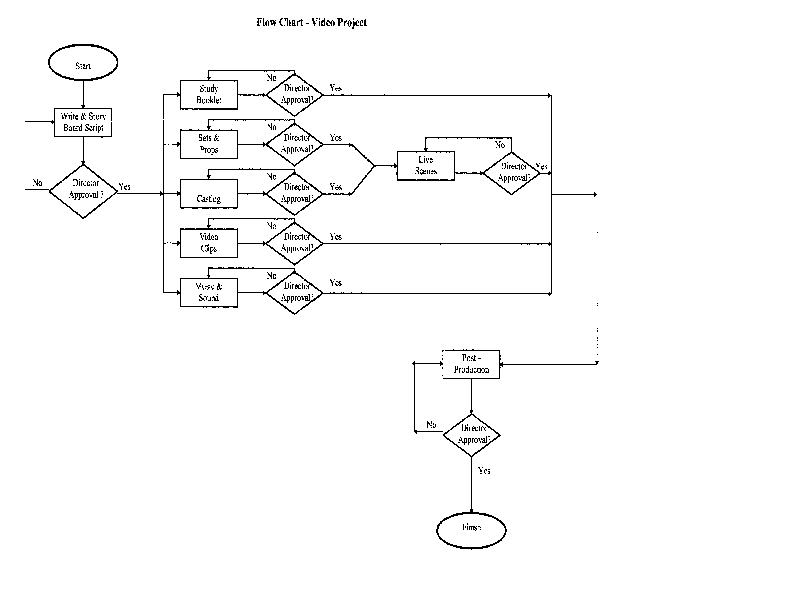
- Flowchart:
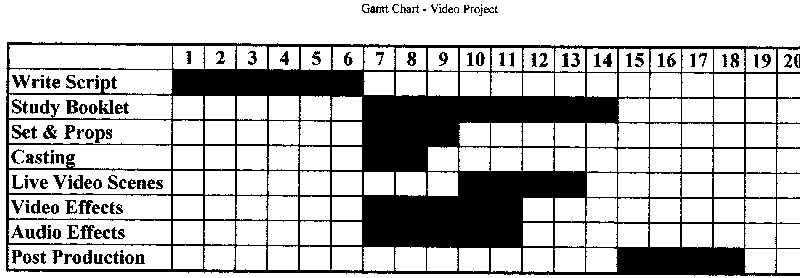
- Gantt chart:
- PERT:

- Gantt chart:
- Flowchart: