- Week 2
- Educational Technology paper:
I reviewed the Association for the Advancement of Computing in Education(AACE). This professional organization was founded in 1981 in Virginia. The link explains that the organization is "dedicated to the advancement of knowledge,theory, and quality of learning and teaching at all levels with information technology."
The page contains seven journal publications, five published books and four CD-roms. Also, it gives information on upcoming conferences dealing with the educational technology field. You may join the organization and receive benefits and useful information reguarding the AACE.
I was browsing through some of the journals on line and I feel that this organization can be a useful resource in my classroom although, I need to become more knowledgeable in the field of computer information.
I definately will include this site on my web page because it will be something I will use when joining professional organizations.
AACE can be found at maiAACE@virginia.edu - Curriculum resource:
Reader Rabbit 3 Deluxe is a CD-rom that is made by The Learning Company. This software is appropriate for students Ages 6-11. This software was preceeded by RR1 and RR2 which are reading instruction disks. A rabbit takes you to the town of Wordville in which many characters report on the days events and create a newspaper called the Daily Skywriter. Newspapers include different parts of the sentences to form correct sentences.
Students attempt to understand the different parts of a sentence through an interactive and colorful game. Following steps designed by the game the child is able to take their paper to the printing press and see a final copy of the paper they have created.
Students enjoy this software because they are able to see progress and success in a short amount of time. The sounds and graphics are interesting and keep the students attention for the majority of the lesson.
I use the terms in this software to give the children different terms to explain sentence parts. It is used as a learning center in the classroom and the students are able to save the information and access it the next day.
I would recommend this software to teachers teaching parts of speech or need another way let the students interact with classroom technology.
Biblography:Reader Rabbit 3 deluxe The Learning Company, 6493 Kaiser Drive Fremont, CA 94555 - News article:
Volume 32 number 1 Jan and Feb
www.educom.edu/web/pubs/review/review articles/32148.html
I reviewed an article by Howard Kaplan titled Interactive Multimedia and the World Wide Web.
The article was about the opportunities in distance learning at the university level. Not only are classes for higher level learning being offered through e-mail but over the internet. The classes are using video and audio technology and amazingly interactive.
Many companies are involved and promoting their services touniversities. The major companies such as Netscape and Microsoft as well as Java,Shockware and Quick time video.
An example of one of these projects was in the area of physics. Java made an applet on projectile motion to set launch angle coefficient of linear resistance.
The article gives a listing of distance learning offerings. It gives the pros and cons from many different perspectives on distance learning.
- Educational Technology paper:
- Week 3
- Educational Technology paper:
- Curriculum resource:
- News article:
- Educational Technology paper:
- Week 4
- Educational Technology paper:
WEEK 4; Paper 1
I looked into the clearinghouse for Disabilities and Gifted Education. This had a Gopher menu with many digests to research. Although there were many choices, I went with Academic interventions for children with dislexia because I am tutoring a boy with the disability.
The Digest gives a detailed overview and a definition. Also, I learned the history and found that many students with dislexia are classified falsely. Specific assessment techniques were included and listed for teachers use.
I found some specific intervention techniques I can use with my student. First, I need to work on his metacognitive strategies and I need to teach him stategies for automaticity.
ERIC stands for Educational Research and Improvement and it is brought to us by the United States Department of Education. Many resouces and E-mail addresses are included for further information.
- Curriculum resource:
WEEK 4; Paper 2
This home page is a great link for students in Margo's class. It is packed with information and relevant links. I enjoyed the pictures and images she included because they brought some excitement to the work. This is an excellent idea for reinforcement and further research outside the classroom.
Some changes I thought could have made the page look more exciting were in the text presentation. I think the globe should be centered and her name should be some what bigger. A possible blinking or highlight for Welcome To Team 7-2 would look very cool. Change the topics to different colors and color coordinate the text in the link, if possible.
- News article:
WEEK 5; Paper 3
I researched a cite (http://www.pathfinder.com) and found that Microsoft is considering making Windows an option for some vehicles for the future.
The idea is that a user could have a personal information manager for a car. The individual would have easy access to address and appointments which could be matched with data from laptops by infrared ports.
E-mail can be accessed by voice activation and the driver can keep their hands on the wheel and their eyes on the road. With this technology in your vehicle and the expected cost in 1998, you do not need a house. Everything a buisness man or woman needs is in his form of transportation. We are progressing towards a traveling office.
- Educational Technology paper:
- Week 5
- Educational Technology paper:
The address to the ERIC digest that I researched is ericae2.educ.cua.edu/db/edo/ED395214.htm Title:Distance Learning,the Internet , and the World Wide Web. ERIC Digest.,Kerka,Sandra
The digest gave a brief history of distance learning. Then it gave some new ideas that are available today.
DL(distance learning)on the internet takes many forms. For example,bulletin boards/newsgroups for discussion of special topics or realtime, interactive conferencing using Moo systems or Internet Relay Chat.
The digest included some examples of DL. At Carnegie-Mellon, a virtual corporation simulates a work setting for buisness students. Also CUSeeMe software enables a technology teacher supervisor to observe their student teacher through video conferencing on the internet.
There are advantages listed:
1. quick development time compared to videos and cd-roms
2. lower developmental and operating costs.
3. Equity is mentioned as a benefit of online-learningThere are also some disadvantages:
1. social isolation can be a drawback
2. The internet is still difficult to use in some rural communities and for the disabled.
3. It may breed passivityMany good strategie were listed:
1.understand the technology being used
2.develop information management skills and assist learners in critical assessment
3. combine e-mail and video to enhance socialization. - Curriculum resource:
- News article:
- Educational Technology paper:
- Week 6
- Educational Technology paper:
Hal,
This is a sample of three objectives included in my curriculum plan.
Intro : I am a Special Education teacher in a third and fourth grade self contained classroom. Students are learning disabled and emotionally disturbed with primary disabilities in reading and written expression.
Goal: To use strategies of early literacy in teaching reading and writing within a Special Education classroom. A. (3 days) Obj: Students will write their own three page story with illustrations.
STEPS TO PROCESS:
1. In journal, students will start brainstorming and writing ideas of their choice.
2. Students choose a common theme to make three sentences.(20 minutes)
3. Draft three sentences on a common theme. (30 minutes)
4. Students will edit sentences individually with teacher. (10 minutes)
5. A blank binded book will be produced to complete the rewrite of three sentences. (15 minutes)
6. Students will copy in book and illustrate. (20 minutes)
B.( all year) OBJ: Students will create stories in a fictional newspaper using Reader Rabbit Three software by The Learning Company.
1. Students will learn the major parts of sentences using the different steps of the editing process.
2. Students choose correct words to complete sentences using context clues.
3. Students learn correct paragraph construction when writing stories.
4. Students learn capitalization and punctuation when writing sentences and paragraphs.
C. (two weeks per bundle of words) OBJ: Using a Language Master and a sight word game "Boom", students will build their sight word vocabulary, in order to read and write high frequency words.
1. A Language Master is a machine in which the word or sentence is written on the card and recorded. As the student slides the card through, the contents on the card are repeated twice and read for mastery.
2. Students play a sight word memory game in small groups of three or four to recall, read, and say high frequency words. The winner of the game remembers the most words and moves on to a more difficult level.
- Curriculum resource:
- News article:
- Educational Technology paper:
- Week 7
- Educational Technology paper:
- Curriculum resource:
- News article:
A new cirriculum has been developed by Cisco Networking Academies. The program targets to teach and certify high school students to design, build,and maintain computer networks.
The program allows students to gain the know-how capable of supporting national and global organizations. Cysco has supported more than one thousand students with 18 million dollars. This program will make the transition from school to career meaningful and hopefully provide those students with immediate positions.
Designers describe the program as "the shop of the 21st centry". Instead of auto mechanics and wood cutting,students learn the conceptual and practical skills necessary to design and manage networks. URL: www.newstream.com/97-312.shtml
- Educational Technology paper:
- Week 8
- Educational Technology paper:
I chose the Hannifan Peck Design Model:
This is a three phase plan that includes needs assessment, design and development and implementation. During each phase evaluation and revision is a requirement.
I will use the writing process to describe the use of this plan in my classroom.
STEPS:
1.Prewiting:students think about and take short notes about their writing piece.(needs assessment)
2.Write and Draft: students write their first draft from their plan. The key is that the ideas are being transfered into words for a sustained time.(Design portion of plan)
3.Editing: Students reread and correct and rescript their first draft. This is the first time the teacher gets involved.(Development and implementation)
4.During the entire writing process the author constantly evaluates and revises until the final draft is completed.
- Curriculum resource:
Paper 2 for Michael Leib
The non-computer technology that I looked into was Video Conferencing Systems. Web Site-
www.rcc.ryerson.ca/schools/rta/brd038/papers/1996/vidcam
This was my first experience with video conferencing. The company is Panasonic and the site was filled with information on what is new. There are quarter inch digtal tapes now avaliable for digital cameras. These are small enough for direct imput into computers. Panasonic has mastered an eyepiece that focuses automatically on the image being looked at. This video conferencing camera lets you manipulate the degree of angle the image is looked for. Implicatins for Classroom Teachers:
1.Students can view their own behavior and evaluate what needs to be changed.
2.Students can video tape a yearbook catch the natural situations that may occour in the cafeteria,playground etc.
3.Teachers can video tape themselves to improve and evaluate teaching techniques that will help student success.
- News article:
www.arch.columbia.edu/ddl/cad/a4535/vir.world.class2
This article dealt with Computer Instruction and Virtual World Classrooms. It gave me a detailed description of the CAD systems, schools are using to prepare students for the technology world.
The program is very positive because it provides for fast feed back. Also the system is dedicated to teaching students on their own pace inorder to stay focused on the individual.Cad systems allow students to learn interfaces and adapt to them very quickly. Finally, this system can never be mastered and is apprpriate for the life long learner.
Students using the virtual world aspect of CAD have many advantages. For example they have access to video conferencing and the world wide web. The vitual world provides instant links to appropriate course material and resources. The major strength is that it gives the student the ability to learn and create in his or her desired environment and field.
- Educational Technology paper:
- Week 9
- Sounds:
- Pictures:

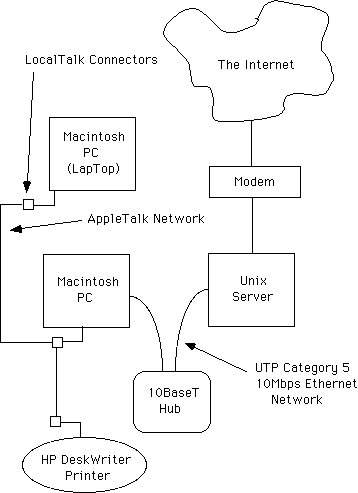
- Network:
- Sounds:
- Week 10
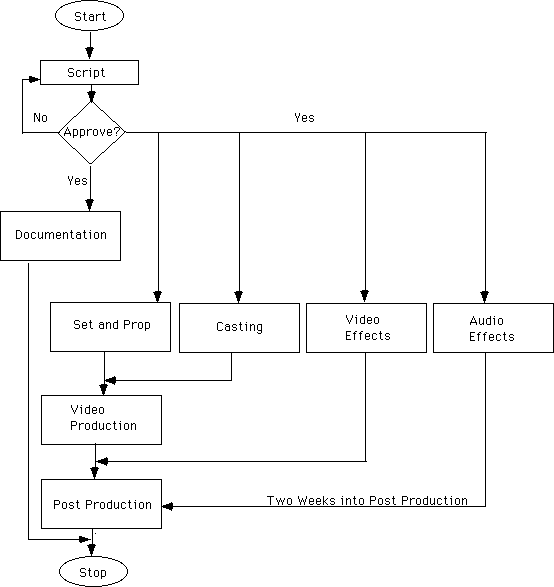
- Flowchart:
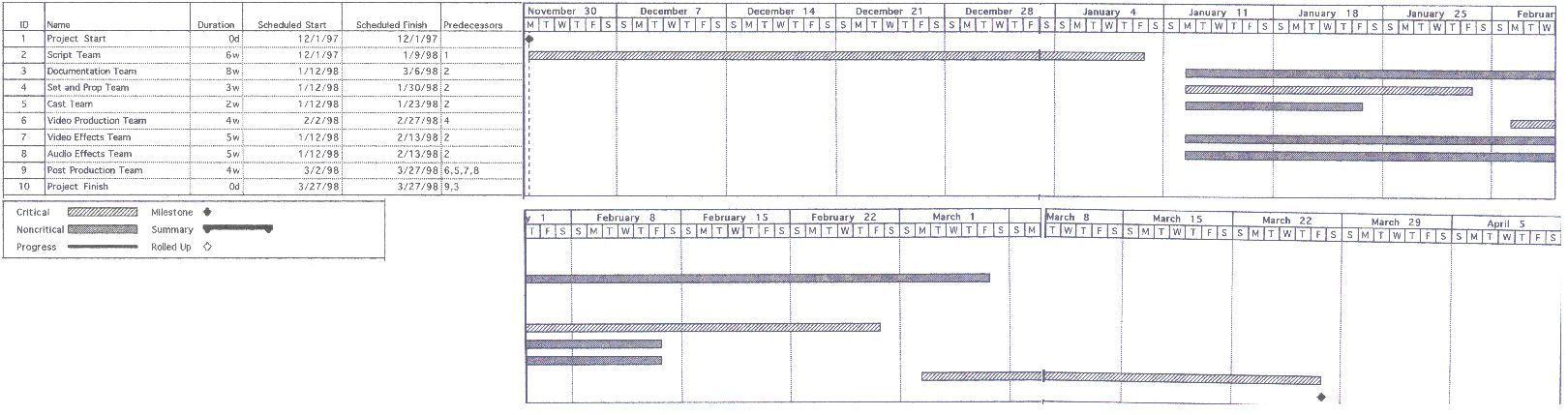
- Gantt chart:
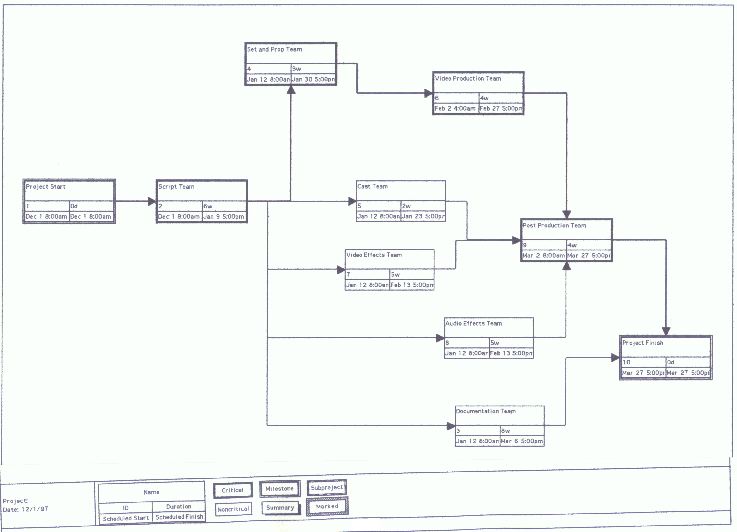
- PERT chart:
- Gantt chart:
- Flowchart: